


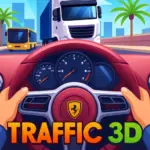
Play Traffic Jam 3D online for free and take the wheel in one of the busiest driving games on the web!
The road is packed with cars, buses, and trucks, and you have to weave between them at full speed.
Reach the next checkpoint before time runs out, rack up points with daring passes, or just see how far you can drive without a single crash.
With over 20 cars to unlock and three different roads to explore, every drive feels like a new adventure. Are you ready to beat the traffic?
What is Traffic Jam 3D
Traffic Jam 3D is a free 3D driving game where you race through heavy traffic on busy roads.
The browser version came out in the summer of 2022. On CrazyGames, it's credited to Great Games, and the game is also available as a mobile app.
Unlike regular racing games, you don't race against other drivers. Your real enemy is the traffic! You have to dodge cars, finish missions, and drive as far as you can.
The game has four game modes, more than 20 cars, three different roads, and lots of ways to upgrade and customize your ride.
With its realistic 3D graphics and simple keyboard controls, it has become one of the most popular car games for quick fun online.
Traffic Jam 3D Gameplay
In Traffic Jam 3D, you drive a car down a busy road full of other vehicles. Your job is to keep moving fast and avoid crashing into anything.
The game has four modes, and each one gives you a different goal:
- Career – Finish missions level by level. You might need to reach checkpoints in time, score a certain number of points, or drive a set distance before the clock runs out.
- Infinite – Drive for as long as you can. The run only ends when you crash.
- Time Against – Race the clock and reach each checkpoint before your time is up.
- Free – Drive around with no pressure and no goals. It's perfect for practice.
You can choose where you drive: the Highway, the Desert, or the City. You can also drive in the morning, afternoon, or evening.
Some roads are one-way, where all cars go in your direction. Others are two-way, with cars coming straight toward you in the other lanes.
As you drive, you earn money. You can spend it in the garage to buy new cars, upgrade your engine, brakes, and handling, and change your car's colors.
You can also use nitro for a quick burst of speed and switch between camera views, including a first-person view from inside the car.
Platform
You can play This game directly in your web browser, whether you're using a desktop, laptop, tablet, or mobile device.
How to Play Traffic Jam 3D?
First, choose a game mode. If you're new, try Free mode to get used to how your car moves.
Next, pick a road and a time of day. The Highway in the morning is the easiest place to start.
When the drive begins, speed up and steer left and right to move between lanes.
Watch the traffic ahead and look for open lanes. Change lanes early so you don't get stuck behind a slow car.
In Career and Time Against, keep an eye on your timer and the distance to the next checkpoint.
After each drive, go to the garage. Spend your money on upgrades or save up for a faster car.
Controls
Traffic Jam 3D is played with the keyboard on a computer.
- Up Arrow – Speed up
- Left Arrow – Move left
- Right Arrow – Move right
- N – Nitro
- E – Horn and lights
- C – Change camera view
Tips And Tricks for Traffic Jam 3D
Start with Free mode. Learn how your car steers and how fast it reacts before trying the timed modes.
Look far ahead. Don't just watch the car in front of you. Scan the road to find the next open lane.
Change lanes early. Moving over at the last second is how most crashes happen.
Save nitro for open roads. Use it when the lane ahead is clear, not when traffic is tight.
Be extra careful on two-way roads. Oncoming cars move toward you very fast, so stay in your own lanes when you're not sure.
Pick the Highway when you need money. Its wide lanes make it easier to drive far without crashing.
Watch out at night. Evening drives look amazing, but it's harder to see cars ahead. Use the E key to turn on your lights.
Upgrade handling and brakes. Better handling helps you dodge cars, and better brakes help you stop before a crash.
Try different cameras. The first-person view feels real, but a view from behind the car shows more of the road.
Features of Traffic Jam 3D
Four game modes: Career, Infinite, Time Against, and Free mode give you a different challenge every time.
Career missions: Reach checkpoints, score points, and drive set distances against the clock.
Three different roads: Drive on the Highway, through the Desert, or across the City.
Day and night driving: Choose morning, afternoon, or evening for a different look and challenge.
One-way and two-way traffic: Pick an easier one-way road or brave the oncoming cars on a two-way road.
Over 20 cars: Earn money and unlock a big collection of vehicles.
Upgrades and customization: Improve your engine, brakes, and handling, and change your car's paint and wheel colors.
Nitro and camera views: Boost your speed with nitro and drive from inside the car or from behind it.
Free browser game: Traffic Jam 3D is one of the most fun car games online. It's a free game with no download, so you can enjoy games online right away.
Traffic Jam 3D Online
The version of Traffic Jam 3D on our website is made to play directly in your browser. You don't need to download or install anything.
It's an adapted browser version of the popular Traffic Jam 3D game, built to load fast and run smoothly.
It works well on all major browsers, including Google Chrome, Mozilla Firefox, Microsoft Edge, Safari, and Opera.
Whether you're on Windows, Mac, or a Chromebook, just open the page and start driving.
If you love browser games, free games, and car games online, Traffic Jam 3D online is a great pick for your next break.
Traffic Jam 3D for Free
You can play Traffic Jam 3D for free on our website. There are no fees and no in-game purchases.
Every car and every upgrade can be unlocked just by driving and earning money in the game.
And that's not all. Every game on our website is free to play, so you can explore as many free games as you like.
Can You Play Traffic Jam 3D Unblocked?
Yes, you can play Traffic Jam 3D unblocked on our website, Driftboss.us.
Whether you're on a break at school, relaxing after class, or taking a lunch break at work, you can open the game in your browser and start driving right away.
There's nothing to install, so it's an easy choice for anyone looking for games unblocked during their free time.
Traffic Jam 3D Unblocked 76
When you play on our website, you don't need to search for Traffic Jam 3D unblocked 76, unblocked 66, or unblocked iOS.
The version on Driftboss.us works on all kinds of devices and networks, and it's completely free.
Just bookmark the page and come back whenever you want to drive.
Traffic Jam 3D GitHub
Many players search for Traffic Jam 3D on GitHub, hoping to find a version they can open anywhere.
With our website, you don't need to dig through GitHub pages or try links that may not work.
The version on Driftboss.us runs smoothly on all devices, whether you're in class during a break or at work during lunch.
Traffic Jam 3D Download
Lots of fans like to have Traffic Jam 3D on their own device for an even smoother experience than playing in a browser. Here's how to get it.
For Android users: Open the Google Play Store, search for "Traffic Jam 3D," and tap the Install button.
For iPhone and iPad users: Open the Apple App Store, search for "Traffic Jam 3D: Car Escape," and tap the Get button to install it.
APK Traffic Jam 3D
Some Android devices don't support the Google Play Store. If that's your case, you can download the Traffic Jam 3D APK file and install it directly on your device.
Only download APK files from trusted websites, and ask a parent or adult to help you check that the file is safe before you install it.
For PC players: The easiest way to play Traffic Jam 3D on your computer is right here in your browser. You can also find many free traffic and driving games on the Steam store.
Why Choose Driftboss.us to Play Traffic Jam 3D?
At Driftboss.us, we love car games, and we want playing them to be quick, easy, and fun.
Our pages load fast, so you can start driving in seconds instead of waiting.
Every game plays right in your browser, with no downloads, no sign-ups, and no payments.
Traffic Jam 3D runs smoothly on computers and Chromebooks, and full-screen mode lets you see every lane clearly.
We also have a big collection of free online games, especially driving and drifting games, so there's always something new to try.
Similar Games to Traffic Jam 3D
If you're a fan of Traffic Jam 3D, you'll definitely enjoy these too:
- Highway Traffic
- Drift Boss
- Highway Racer
- Madalin Stunt Cars 3
FAQs About Traffic Jam 3D
Is Traffic Jam 3D free to play?
Yes! You can play Traffic Jam 3D for free in your browser, with no downloads and no payments.
When did Traffic Jam 3D come out?
The browser version of Traffic Jam 3D was released in mid-2022.
What are the game modes in TrafficJam 3D?
There are four modes: Career, Infinite, Time Against, and Free.
How do you use nitro in Traffic Jam 3D?
Press the N key while driving to get a quick burst of speed.
How do you change the camera in Traffic Jam 3D?
Press the C key to switch between camera views, including the first-person view from inside the car.
How do you get money in Traffic Jam 3D?
You earn money by driving, finishing missions, and avoiding crashes. The longer you drive, the more you earn.
How many cars are in Traffic Jam 3D?
There are more than 20 cars you can unlock with the money you earn.
Can you play Traffic Jam 3D on mobile?
The browser version is made for computers, but you can play Traffic Jam 3D on your phone by downloading the mobile app.
Conclusion
Traffic Jam 3D turns busy roads into an exciting driving challenge. With simple controls and realistic 3D graphics, it's easy to start and hard to stop playing.
With four game modes, three different roads, day and night driving, and over 20 cars to unlock, there's always a new mission to beat or a faster car to earn.
Ready to hit the road? Play Traffic Jam 3D online for free on Driftboss.us right now, and see how far you can drive without crashing!